Must have reliable ‘High Speed’ internet access: Hard-Wired Connection (Not wireless)!
| Specification Name | Requirement |
|---|---|
| Active Monitor Count | Minimum 2 Monitors |
| Active Network Connection Is LAN | Hard-wired connection (No wireless) |
| CPU | -Intel Core– Minimum Series (13-9000, I5-7000, I7-5000, I9) or better. -Pentium G5400/N6400 or better. –XEON E Class or better. -Celeron J4000/N4000/ -AMD Ryzen 3 or better -Athlon 3000, Silver, Gold or better. |
| Free Disk Space | 20 GB |
| Hard Drive Capacity | 60 GB |
| Internet Download Speed | 10.0 Mbps or faster |
| Internet Upload Speed | 3.0 Mbps or faster |
| Latest Windows Revision | Is Windows OS Revision up to date? |
| Monitor Maximum Resolution | 1280 x 1024 recommended (Information Only) |
| Network Latency Max | Less than 120 ms |
| OS | Windows 11 |
| OS Build number | OS Build number |
| OS Version number | OS Version number |
| RAM | 4 GB (Highly Recommend 8 GB or higher!) |
| Windows Revision Number | Windows OS Revision number |
Important: Please ensure that your equipment complies with the minimum system requirements, as well as any additional client-specific requirements outlined in the Program Announcements. This initial PC Check confirms that your system meets the minimum requirements. Should the client program you select have additional technical requirements, you will be prompted to complete an additional PC scan prior to enrolling in the corresponding certification class.
Please note: Our partner Arise does not provide any reimbursement for any business-related expenses incurred during the registration and client program selection process should your equipment not meet the necessary requirements. So, it’s a good idea to double-check everything ahead of time to ensure a successful start!
What is the PC Check and how do I run it?
The PC Check is designed to help you determine if your computer meets some of the minimum requirements to connect through our partner platform.
1. Click “RUN” at the bottom of this page.
2. Depending on your system and security settings, you may see up to two confirmation dialogs, please click “Yes” or “Run” depending on the prompt.
3. Wait for the check to run.
4. Your PC Check results will be displayed.
NOTES: Be sure to open the detection.exe file when prompted. Mozilla Firefox and Google Chrome are recommended. If you encounter an error, please try a different browser. Temporarily turn off virus defenders and pop-up blockers that may be preventing the file from launching. If you continue to get an error message, contact Virtualmeans support.
What if my computer fails any of the checks?
- CPU speed test: Unfortunately, this is not something that can be fixed. Your best option is to use another computer.
- RAM test: Increasing RAM is an easy and very common computer upgrade. Please work with a trained technician or if you feel comfortable performing this yourself, ensure you use the correct RAM upgrade recommended for your computer model.
- Operating System test: Windows 11 is required.
- Is there a support specialist available to check my computer?
Unfortunately, our partner Arise will not be able to assist you in determining if your computer adheres to the System and Equipment policy for use of the our partner with Arise® Platform. After you have register with our partner Arise® Platform, login into the platform and a PC check first before enrolling to our client program job. You will need to run the PC Check here- PC CHECK via ARISE
- PC Device: Windows 11 (Memory: 8-12 GB of RAM or higher).
TYPEs OF PC CPU (Recommend):
- Intel Core– Minimum Series (13-9000, I5-7000, I7-5000, I9) or better.
- Pentium G5400/N6400 or better.
- XEON E Class or better.
- Celeron J4000/N4000/ AMD RYZEN 3 or better.
- AMD Ryzen 3 or better
- Athlon 3000, Silver, Gold or better.
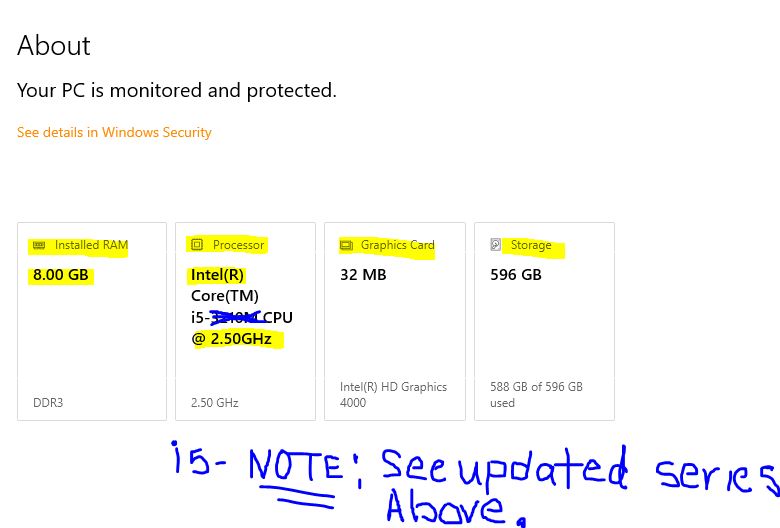
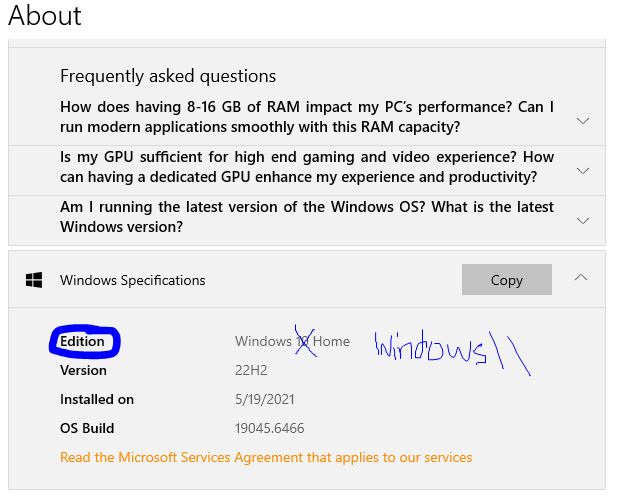
To know the type of PC you may have, see example below:
On your PC—> Go Window icon >
then go wheel –> ‘ Settings’


Look for ‘System‘;
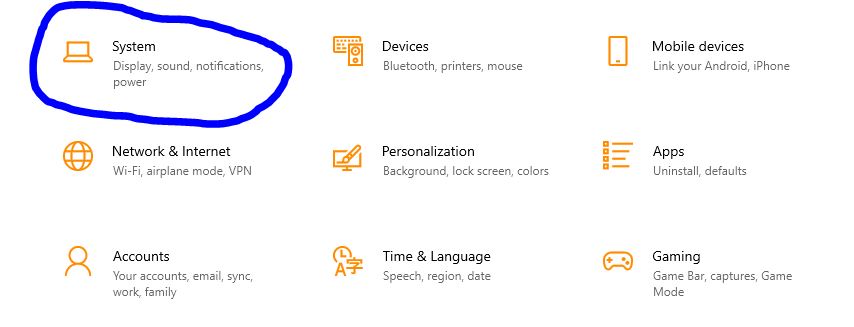
Under ‘System’—>Look for–> ‘About‘
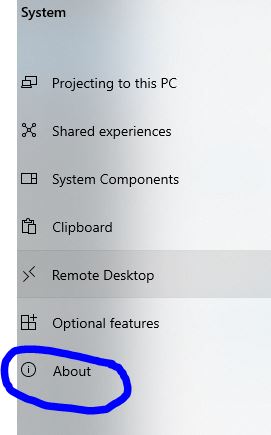
‘About‘-> You should see your type of PC you have, like Window 10 or Windows 11, IOS & CPU info etc.
Below is just an example on how you can find what type of PC you have.